


NovaAI Advanced Search
Advanced Search ensures you never miss critical details,even in large knowledge bases. This lets you control the scope of search, breadth of search, type of search results, and semantic search results.
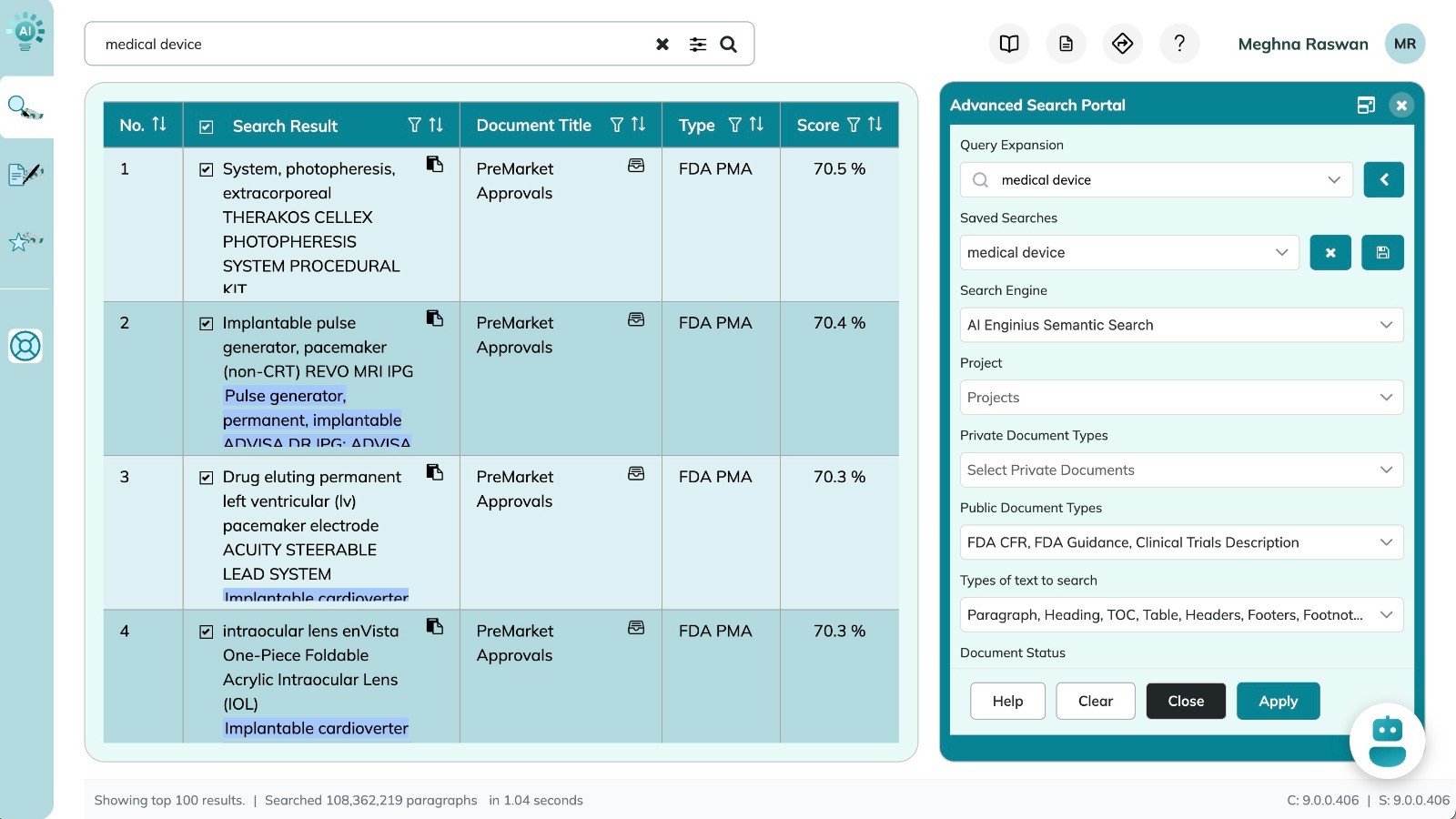

Advanced Search
- Query Expansion : Enter a search phrase and click the arrow to generate up to 10 related variations with the help of AI. This feature generates variations based on what you are trying to search, helping broaden your search without you having to guess synonyms.
- Saved Searches : Save your current search or select from previously saved searches to quickly re-run or modify past queries. This saves time in redundancy of searches and ensures consistency across projects.
- Search Engine Options : Choose how NovaAI interprets your query, from quick lookups to complex queries.
- AI Semantic Search : Understands context and meaning, and accounts for synonyms.
- Simple Keyword Search : Finds text containing any entered keywords.
- Advanced Keyword Search : Click here to learn the advanced search syntax. Supports logical conditions (AND, OR, NOT) for precise search results.
- Project Filter : Narrow your search scope for selected projects to keep results relevant. This includes projects created in Scribe AI.
- Document Type Filters : Select private and/or public document categories to focus on the sources that matter most.
- Private Document Types : Select types of internal documents to include in your search.
- Public Document Types: : Select public documents and databases to include in your search.
- Result Controls: Tailor your results for depth or speed.
- Show Results More Than : Understands context and meanExclude short results by setting a minimum word count.ing, and accounts for synonyms.
- Number of Results to Fetch : Adjust how many results you want (default: 100).
- Types of Text to Search: : Choose which text elements to include (paragraphs, bullet lists, etc.). Fine-tune your scope for maximum relevance.
- Document Status: : Filter by status (default: Active) and avoid outdated content.
- Result Controls: Tailor your results for depth or speed.
- Show Results More Than : Understands context and meanExclude short results by setting a minimum word count.ing, and accounts for synonyms.
- Number of Results to Fetch : Adjust how many results you want (default: 100).
Actions
- Apply: Executes the search with selected filters.
- Clear: Resets all parameters to default.
- Close: Closes the panel without executing the search (changes are saved).
- Help: Opens this guidance for Advanced Search.
- Expand / Collapse: Adjust panel width for better visibility.
Advanced Keyword Search Syntax
1. Advanced Keyword Search Syntax (using logical operators and wildcards):
-
Exact phrase: "medical device data system"
i. returns results containing exact sequence of words -
AND: medical AND device
i. returns results containing all search words -
OR: medical OR device
i. returns results containing any search words -
NOT: medical –device
i. returns results that do not contain the word following “–”–” -
Wildcards: device? or system*
i. Device?: Returns results containing at most one additional letter following the search word. E.g. device, devices
ii. system*: Returns results containing the search word and at least one additional letter following the search word. E.g. system, systems, systematic, systematically - You can combine conditions for complex queries: medical* AND (device? OR data)
Advanced Keyword Search Syntax(using logical operators and wildcards):
Exact phrase
Returns results containing exact sequence of words
"medical device data system"
AND
Returns results containing all search words
medical AND device
OR
Returns results containing any search words
medical OR device
NOT
Returns results that do not contain the word following “-”
medical -device , medical NOT device
Wildcards
device?
system*
device?
Returns results containing at most one additional letter following the search word E.g. device, devices
system*
Returns results containing the search word and at least one additional letter following the search word E.g. system, systems, systematic, systematically
Combined Conditions
You can combine conditions for complex queries: